


It's 4:45 p.m. The crew's still at the job, the office is trying to find a signed change order, and a customer's latest instructions are buried in a text thread. Your estimator priced the original scope correctly, but nobody updated the job record when the customer added work. The invoice will go out late, and the payment clock won't start until the customer has the paperwork they need.
That's the problem electrical contractor software should solve. Not by giving you another dashboard, but by connecting the estimate, the field record, the approved change, and the invoice so your team can protect margin and get paid with less chasing.
The Jobsite Problem Most Software Pitches Ignore
A three-truck shop can look busy and still lose money in small, avoidable ways. A technician drives across town because dispatch didn't see that another crew was finishing nearby. A box of fittings gets bought on a company card without a job reference. The customer approves extra work by phone, but the paper change order stays in the truck.
None of those failures looks dramatic in isolation. Together, they leave the owner guessing about labor, materials, and what the customer authorized. A slow payment cycle makes the damage harder to spot because completed work and cash in the bank are separated by weeks.

A generic CRM can manage contacts. Accounting software can record invoices. A calendar can assign appointments. But none of those tools, on its own, reliably links an electrical estimate to a technician's field notes, material usage, customer approval, and final bill.
The operational test: Can your office see what was sold, what changed, what the crew installed, and what remains billable without piecing it together from messages and paper?
If the answer is no, adding more software won't help unless it closes that gap. The right platform makes the job record the shared source of truth, not another place for the team to retype information.
What Electrical Contractor Software Actually Does
Electrical contractor software is an integrated system for running work from the first request through payment. It differs from generic accounting or CRM software because it must connect office decisions to what technicians do in the field.Think of it as a switchboard for each job. Information comes in from different parts of the business, but the system routes it to the people who need it and carries changes forward instead of letting them disappear in separate tools.
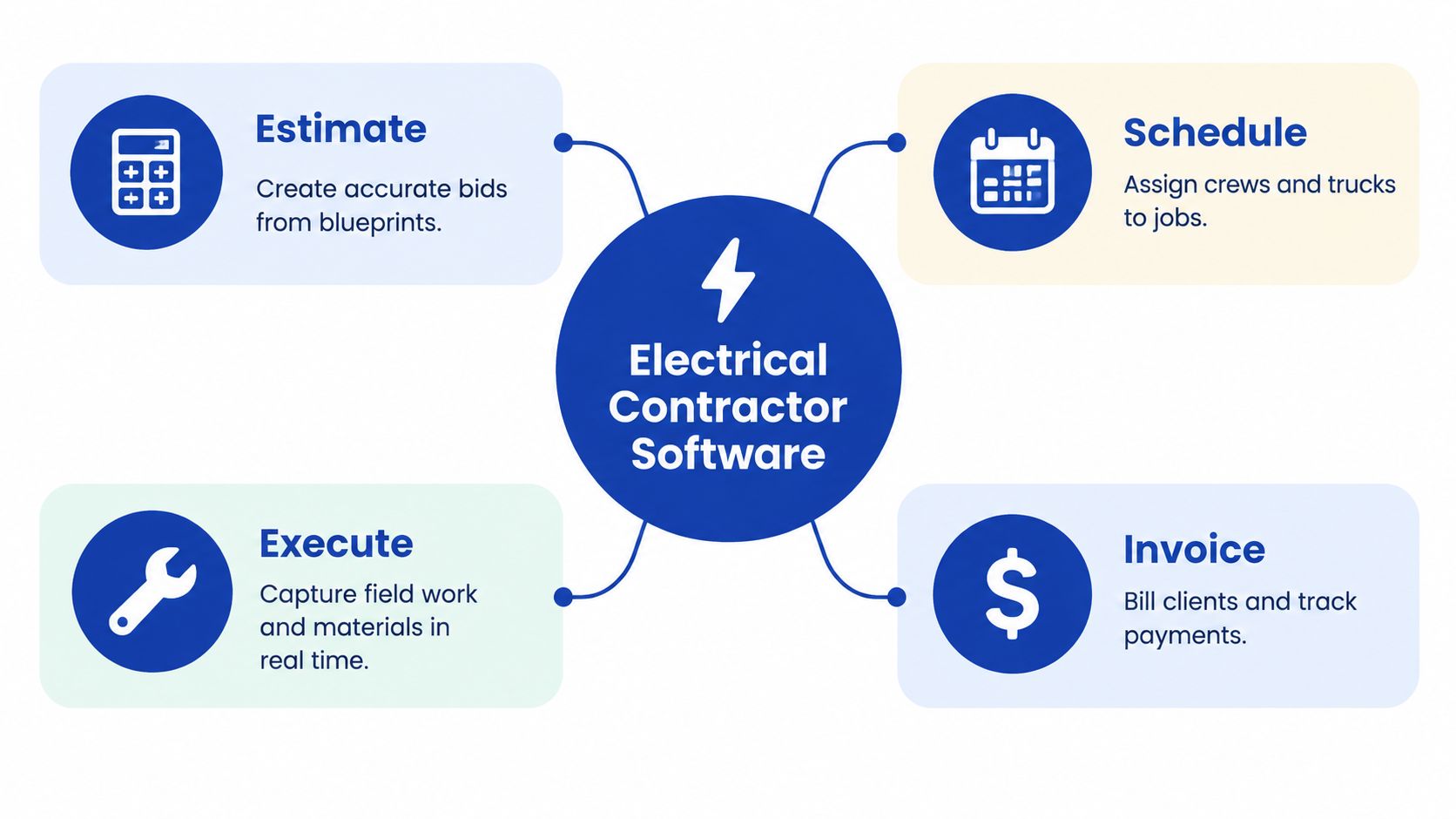
Four connected stages
Estimate. Build a bid from the scope, drawings, labor assumptions, and material requirements. A good estimate should become the job's working budget, not a document that the team later has to recreate. Schedule. Assign the right crew and vehicle, account for availability, and give technicians the job details they need. Dispatch should see changes as they happen, not after a technician calls the office. Execute. Capture time, materials, photos, field notes, deficiencies, and approved scope changes against the job. The crew should be able to do this on a mobile device, including when internet access is unreliable. Invoice. Turn completed and approved work into a clear bill, then track its status. If the invoice requires someone to search email for photos or find a signed paper form, the job record isn't complete.Project-management applications represented the largest application segment of the electrical-contractor-software market in 2025, accounting for 28.5% of revenue, or roughly $911.2 million, according to Market Intelo's electrical contractor software market estimate. That's a useful signal: contractors need more than isolated bookkeeping. For help keeping tax and accounting workflows organized alongside operations, Blue Sage Tax & Accounting for electricians offers an electrician-focused resource.
Core Features That Actually Move the Needle
Don't buy a platform because its feature list is long. Buy it because it prevents a specific, expensive failure in your workflow.
Start with the job's cost and plan
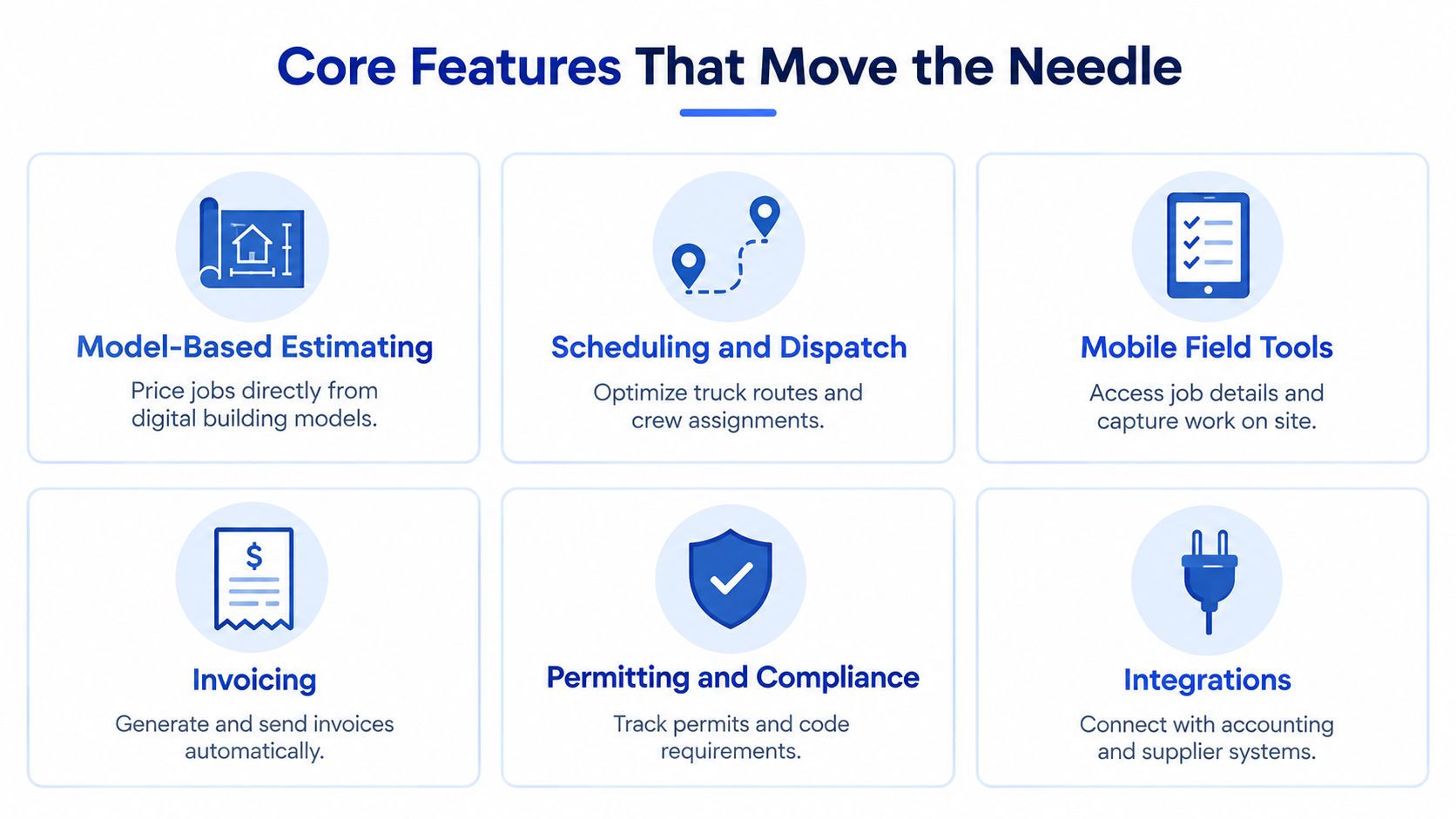
Model-based estimating should connect quantities and assemblies to labor and material assumptions. Electrical respondents to a 2025 MEP-firm survey identified model-based estimating as especially promising, alongside digital field-installation tools and purchasing and inventory management, as described in EC&M's coverage of the survey. The practical requirement is traceability: a material line should retain its item identifier, quantity, cost basis, and connection to a cost code or drawing location. Otherwise, bid quantities and site purchases drift apart. Scheduling and dispatch prevent idle time and avoidable travel. A dispatcher needs to see crew availability, job location, skills, and changes to the day's work. A calendar that can't carry job instructions or update the technician's view is only half a system.Make field updates usable
Mobile field tools should make it easy to record labor, installed materials, photos, and customer approvals without a trip back to the office. Offline capture matters when a jobsite connection drops. If field staff have to fight the interface, they'll go back to texts and paper. Permitting and compliance tracking should put permit status, inspection records, and relevant job documents where office and field teams can find them. Missed documentation can delay closeout even when the electrical work is finished. Integrations reduce double entry. Connect accounting and supplier workflows where the data needs to move, then test whether job costs and invoice details reconcile rather than assuming a vendor's integration label means the workflow is complete.Electrical contractors use software for invoicing and billing (73%), scheduling and dispatch (70%), project management (68%), and estimating and bidding (55%); 75% prioritize mobile field access when evaluating software, according to the industry compilation at 9cv9. Treat those figures as survey indicators, not a universal census. They reinforce a sensible buying order: make the core job flow work before paying for extras.
A Quick Evaluation Matrix for the Right Tier
Choose the simplest platform that can manage your real work without forcing staff into side spreadsheets. A solo electrician and a commercial MEP firm don't need the same depth of dispatch, approvals, or cost reporting.
Use this matrix to define what “enough” means for your operation. It's a shortlist filter, not a vendor scorecard.
| Business Size | Estimating | Scheduling | Mobile Field | Integrations |
|---|---|---|---|---|
| Solo electrician | Fast quotes and reusable job templates | Simple calendar with reminders | Job notes, photos, and customer sign-off | Accounting and payment tools |
| 2–5 truck shop | Labor and material estimates linked to job records | Crew and truck assignment with dispatch updates | Time, materials, change orders, and photos | Accounting plus supplier records |
| 6–20 truck multi-crew | Cost codes, approvals, and budget-versus-actual visibility | Multi-crew scheduling and clear reassignment | Offline updates and job-level documentation | Accounting, purchasing, and reporting |
| Commercial MEP firm | Drawing or model-linked estimating and formal scope control | Project schedules, crew coordination, and dependencies | Field records, deficiencies, and documented approvals | Project, accounting, procurement, and reporting systems |
A two-truck shop shouldn't buy a complex project suite just because it can. But it also shouldn't settle for a quote-and-calendar app if purchase orders, labor, and job costs already live in separate files.
Practical rule: If a platform can't show estimated cost beside actual labor and material commitments, it may organize work without helping you protect margin.
For a deeper look at job-costing requirements, use this construction job costing software guide. You can also compare the operational tools you already use against a broader home service business software overview.
Implementation and Onboarding Without the Drama
A rollout fails when the owner treats it as an IT installation and expects the crew to adapt by osmosis. Treat it as a workflow change with clear owners, a live pilot, and rules for what belongs in the system.
A practical sequence is:
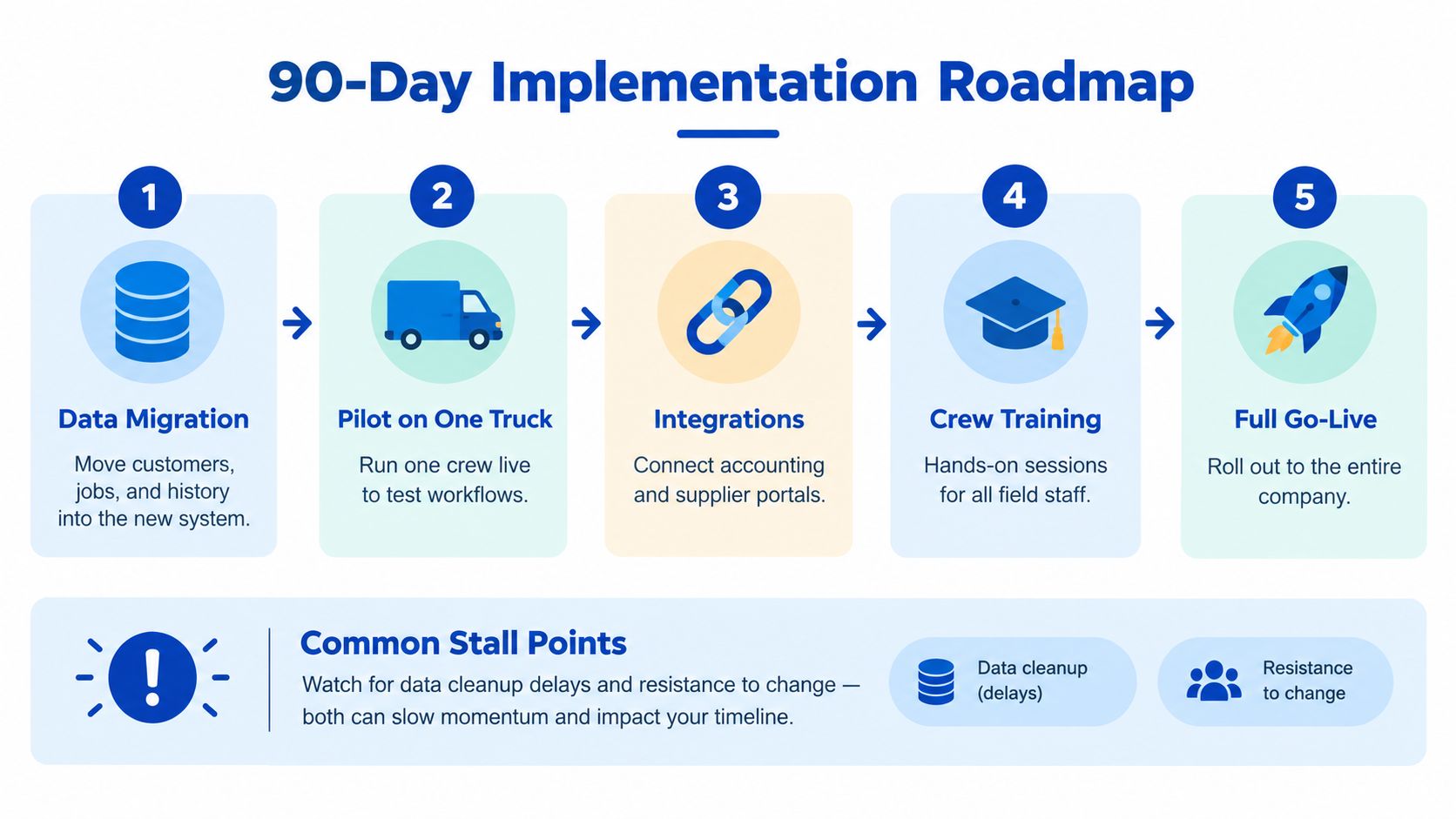
The hardest part is usually not the software. It's getting consistent records from people who already have a familiar way to get through the day. Make the new process faster than the old one, and have a respected technician help test it.
A 2025 survey of more than 1,000 commercial specialty contractors found that communication tools were used by 80% of respondents, project-management software by 51%, and specialized workforce-management software by 40%, a pattern that points to disconnected systems. The ServiceTitan survey announcement supports a simple implementation priority: map how information currently moves before you configure integrations.
Pricing Models and What ROI Actually Looks Like
Software pricing usually comes in one of three forms. Per-user pricing charges for each person who needs access, which can be simple for a small office but expensive if every field worker needs a login. Per-license or tiered pricing packages features or capacity, so check whether essential functions such as dispatch, reporting, or integrations sit behind a higher tier. All-in platforms bundle more of the workflow, but a broad package only makes sense if your team will use it.
Don't accept a price comparison based only on the monthly subscription. Include onboarding, data cleanup, integration work, payment fees, and the time your office spends maintaining workarounds. A cheaper tool can cost more if it leaves job costing and approvals in spreadsheets.
Track the levers software should change
The return isn't a vague promise of efficiency. Track whether estimates include the right labor and materials, whether approved change orders make it onto the bill, whether technicians' time and purchases are attached to the right jobs, and how long completed work sits before invoicing.
Use a simple baseline before signing. Compare the same workflows after adoption, and ask the vendor to demonstrate them with one of your own jobs. If the demo can't show an estimate becoming a budget, field costs updating the job, and approved work reaching the invoice, the product hasn't proved its value.
Don't pay for a dashboard that reports a margin problem after the job is closed. Choose a system that gives the office enough visibility to respond while work is still underway.
Invoice workflows also deserve careful selection. This contractor invoice software overview can help you assess how billing tools fit into the larger job record, rather than treating invoice creation as an isolated task.
The Missing Layer, Trust, Evidence, and Faster Payment
Sending an invoice electronically doesn't resolve missing approvals or disputed work. Payment is partly an accounting workflow, but it's also a trust-and-evidence workflow: the customer or general contractor needs to understand who did the work, what changed, and whether the job is complete.
Construction-payment reporting says 82% of contractors wait more than 30 days to be paid, the average payment cycle is about 57 days, and payment delays cost the industry roughly $280 billion annually, according to Kolena's contractor payment software discussion. Those figures describe a broad industry problem; they don't mean software alone can dictate a customer's payment terms. But better records can prevent avoidable disputes from adding more delay.
Make the invoice easy to defend
Attach the evidence that answers predictable questions:
The aim isn't paperwork for its own sake. It's a clean trail that makes it easier for a property manager, homeowner, or general contractor to verify what they're being asked to pay for. For a closer look at building a usable visual record, see this guide to construction photo documentation software.
How HomeProBadge Complements Your Software Stack
Field-service and project-management systems should run dispatch, estimates, job costs, and accounting workflows. They don't always provide a customer-facing way to verify a contractor's credentials or tie finished work to a credible public record. That gap matters when a homeowner is comparing electricians or a project stakeholder needs to confirm the work behind an invoice.
HomeProBadge adds a trust and proof layer alongside operational software. It verifies identity, background, licensing, and insurance, then presents those credentials on a public professional profile with a permanent URL and TrustBadge. Its proof-of-work records connect job documentation to specific projects, while structured verified reviews are tied to real work rather than standing alone as general praise.Keep proof connected to the job
For electricians, job records can include before-and-after photos, work summaries, recommendations, care notes, and relevant electrical details such as panel type, amperage, circuit information, permit status, and code compliance. Those records can help make closeout clearer for customers and provide supporting context when a stakeholder reviews completed work.
The platform also uses AI to turn uploaded before-and-after photos into customer reports and social content. It can prepare captions styled for Facebook, X, LinkedIn, Instagram, and TikTok, then syndicate the content. That gives a contractor a way to share completed work and build organic referrals without relying on pay-per-lead marketplaces.
Invoicing and payment links add another layer to the workflow. HomeProBadge supports invoices created from electrical job records and Stripe-secured card or ACH payments. That doesn't guarantee a faster payment, but it can help bring the invoice, job evidence, and payment request closer together.
Homeowners can search a directory of verified professionals, view job photos and video testimonials, and access county-specific permit violation action plans across the United States. For a contractor, the practical question is whether a public trust profile and job documentation complement the dispatch and accounting system already in use, rather than trying to replace it.
Before you sign, check the fit
Final questions from the crew and office
Who owns our data? Get the answer in writing. Confirm export formats, what happens at cancellation, and whether you can retrieve job records and customer information without vendor assistance. How hard is switching later? The main cost is usually not moving a login. It's cleaning records, retraining people, and rebuilding integrations. Protect your options by checking export capability before signing. How long does training take? It depends on the workflow and the team. Ask for role-specific training, then judge readiness by whether staff can complete real tasks without reverting to texts and paper. What if the crew resists? Start with one technician who wants the process to work. Remove unnecessary steps, make the field workflow useful to the crew, and set a clear rule that job records belong in the system.Make the buying decision against a real job: bring an estimate, a field change, photos, and a closeout invoice to the demo. Ask the vendor to show how each record stays connected, then choose the system your team can use consistently.
HomeProBadge adds verified credentials, project-linked proof-of-work, customer-facing job reports, social syndication, and Stripe-secured payment options alongside your electrical contractor software. Visit HomeProBadge to review how its trust tools could fit your current field-service and accounting workflow.